
Horizontal Scaling and Application Tiering for High Availability, Security, and Performance
Refer: https://documentation.solarwinds.com/en/success_center/servu/content/servu_documentation.htm
Introduction
Serv-U is a high-performance secure file transfer server for Windows and Linux. It supports FTP, FTPS (SSL/TLS), SFTP (SSH), HTTP, and HTTPS connections, and includes optimized interfaces for web browsers and mobile devices (e.g., iPad, iPhone, BlackBerry, Android, Microsoft Windows Mobile, and Kindle Fire).
To support stringent redundancy, security, and performance requirements Serv-U supports both multi-tier and high availability architectures. This document describes Serv-U’s support for these distributed architectures and their relative advantages and disadvantages.
“No Data in DMZ” for Managed File Transfer
A multi-tier Serv-U / Serv-U Gateway deployment allows you to meet a common managed file transfer requirement: “never store data at rest in a DMZ.”
Serv-U Gateway safely proxies incoming connections from the Internet to your Serv-U server without opening any connections from the Internet or your DMZ segment into your trusted network.
The File Sharing module of Serv-U currently does not support High Availability environments. High Availability is designed for file transfers only.
High Availability through Horizontal Scaling
Both the core Serv-U server and Serv-U Gateway can be deployed in “N+1” configurations to achieve high availability through horizontal scaling. This allows you to avoid single points of failure or scale up to meet your needs.
Hardware requirements
This section contains the minimum hardware requirements that need to be met, so that a given number of simultaneous transfers can be handled through the different protocols.
The provided data refer to single-instance Serv-U installations. For example, a single-instance installation can handle 500 simultaneous transfers through FTP with the given hardware. If you expect to have 1000 simultaneous transfers, it is recommended that you install 2 Serv-U instances, each of them meeting the requirements needed to handle 500 simultaneous transfers.
If the load is higher than expected for a given configuration, Serv-U remains functional, but the transfer rates will be diminished, and the user interface becomes less responsive.
| NUMBER OF SIMULTANEOUS TRANSFERS PER PROTOCOL | FTP (UNCOMPRESSED **), HTTP | ENCRYPTED (HTTPS, SFTP) |
| 10 | 512 MB RAM 7200 RPM HDD 2 core CPU * | 1 GB RAM 7200 RPM HDD 4 core CPU* |
| 25 | 1 GB RAM 7200 RPM HDD 2 core CPU * | 2 GB RAM 7200 RPM HDD 4 core CPU* |
| 50 | 2 GB RAM 10000 RPM HDD 4 core CPU* | 4 GB RAM 10000 RPM HDD 4+ core CPU* |
| 100 | 4 GB RAM 2x 10000 RPM HDD (RAID) 4 core CPU* | Multiple instances of Serv-U (2x) |
| 200 | 4+ GB RAM SSD HDD or 2x 10000 RPM HDD 4+ core CPU* | Multiple instances of Serv-U (4x) |
| 500 | 8+ GB RAM SSD HDD or 2x 15000 HDD (RAID) 8+ core CPU* | Please contact SolarWinds to define the requirements for your environment. |
| 1000 | Multiple instances of Serv-U (2x) | Please contact SolarWinds to define the requirements for your environment. |
* Using CPU with higher performance per core has significantly better impact on performance than increasing the number of CPU cores, therefore it is recommended that you use CPUs with higher clock rates.
** These recommendation are valid for FTP transfers with data compression disabled. If data compression is enabled, CPU requirements are notably higher. For best results, it is recommended to use CPU with as high performance per core as possible.
Scalability tips and best practices
- One Serv-U Gateway should be capable of gracefully handling at least 2 Serv-U server instances.
- Opening a list of users in the Management Console is a highly CPU intensive operation. For better performance, it is recommended that you divide users into collections, and avoid managing users’ lists during heavy loads.
- It is also recommended that during heavy loads, you avoid opening and navigating in the Management Console, especially on pages that display logs which are refreshed at short intervals.
- For best performance, use a HDD or SSD with high IOPS rate. A high IOPS rate increases the performance in the case of 50+ simultaneous transfers.
- The recommended network speed is 1000+ Mbit/s for all types of file transfers.
Basic deployment
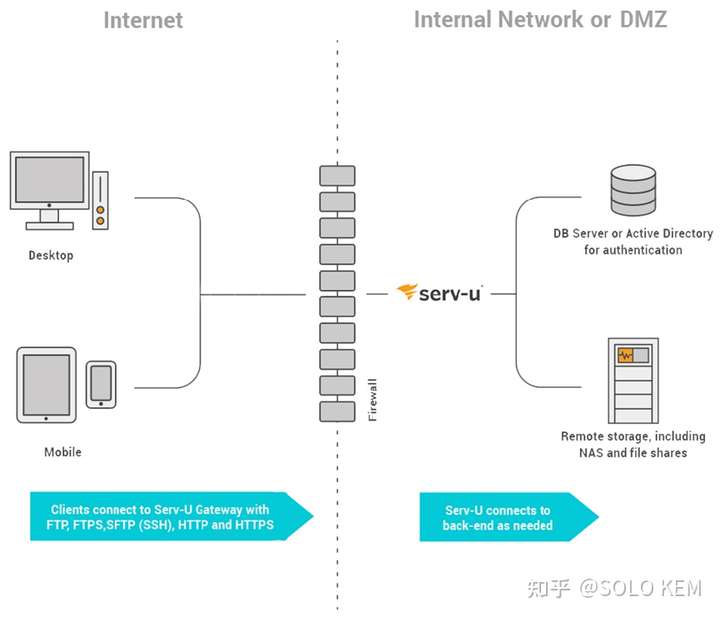
When Serv-U is deployed as a standalone server it is typically protected from the Internet by a single firewall. It may be connected to remote storage or remote authentication sources. All editions of Serv-U may be deployed in this architecture, but only Serv-U MFT Server may leverage external authentication sources.

Firewall Configuration
The primary firewall supports FTP, FTPS (SSL/TLS), SFTP (SSH), HTTP, and/or HTTPS inbound connections from the Internet into Serv-U. This firewall may also be configured to allow outbound connections for support FTP/S active mode data connections, or may be “FTP aware” enough to open FTP data channels dynamically.
Variations
- If Serv-U accesses remote storage (for example, NAS or file shares), then Serv-U must be able to make a CIFS (Windows networking) connection to those resources.
- If Serv-U accesses an ODBC-compliant database for remote authentication, then Serv-U must be able to make a database-appropriate connection to that database. For example, SQL Server connections are often made over TCP port 1433.
- If Serv-U accesses Active Directory (“AD”) for remote authentication, then your Serv-U server must be part of the AD domain and must be on the same network segment.
Advantages
- Easiest configuration to set up. (This configuration is recommended during functional evaluation of Serv-U software.)
Disadvantages
- No active redundancy means the Serv-U server is a single point of failure.
- Direct connections from Serv-U to internal storage, internal databases, or Active Directory domain controllers are not permitted by many security policies.
Basic multi-tier (MFT) deployment
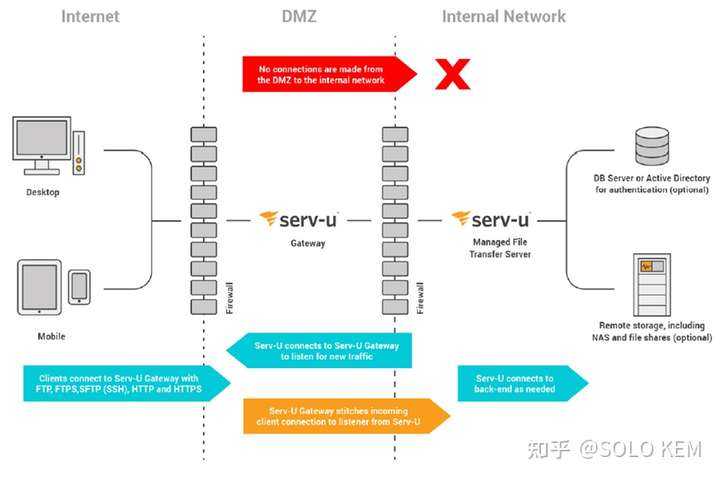
The Serv-U Gateway allows you to deploy Serv-U in a multi-tier architecture that meets or exceeds most managed file transfer (“MFT”) security requirements. This architecture allows you to:
- Terminate all incoming transfer connections on a hardened server located in your DMZ segment
- Ensure no data is ever stored in your DMZ segment
- Avoid opening any inbound connections from your DMZ segment to the internal network
Serv-U FTP Server* and Serv-U MFT Server may be deployed in this architecture, but Serv-U MFT Server should be used if you support SFTP (SSH) or HTTPS transfers or plan to leverage external authentication sources.

* Serv-U FTP Server does not support SFTP or HTTPS.
Firewall Configuration
The firewall between the Internet and the DMZ segment supports FTP, FTPS (SSL/TLS), SFTP (SSH), HTTP, and/or HTTPS inbound connections from the Internet into Serv-U. This firewall may also be configured to allow outbound connections to support FTP/S active mode data connections, or may be “FTP aware” enough to open FTP data channels dynamically.
The firewall between the DMZ segment and the internal network only needs to allow outbound connections from Serv-U to Serv-U Gateway over TCP port 1180.
Variations
- If Serv-U accesses remote storage (for example, NAS or file shares), then Serv-U must be able to make a CIFS (Windows networking) connection to those resources.
- If Serv-U accesses an ODBC-compliant database for remote authentication, then Serv-U must be able to make a database-appropriate connection to that database. For example, SQL Server connections are often made over TCP port 1433.
- If Serv-U accesses Active Directory (“AD”) for remote authentication, then your Serv-U server must be part of the AD domain and must be on the same network segment.
- The two firewalls represented in the diagram are really often “two legs” of a single firewall controlling access between multiple segments.
- Serv-U Gateway and Serv-U may be deployed on different operating systems, for example, your Internet-facing Serv-U Gateway can be deployed on Linux even if you have deployed your Serv-U server on Windows.
Advantages
- Still easy to set up. (Install Serv-U Gateway, define Serv-U Gateway, define Serv-U listeners, test, and go.)
- Fully satisfies the MFT requirement that no data at rest exists in the DMZ.
- Satisfies most security policy requirements by ensuring that direct connections to internal storage, internal databases, or Active Directory domain controllers are only made between computers on your trusted internal network.
- No CIFS, AD, or DB connections are ever made across a firewall.
Disadvantages
No active redundancy means the Serv-U server and Serv-U Gateway are single points of failure.
Basic high availability (N+1) deployment
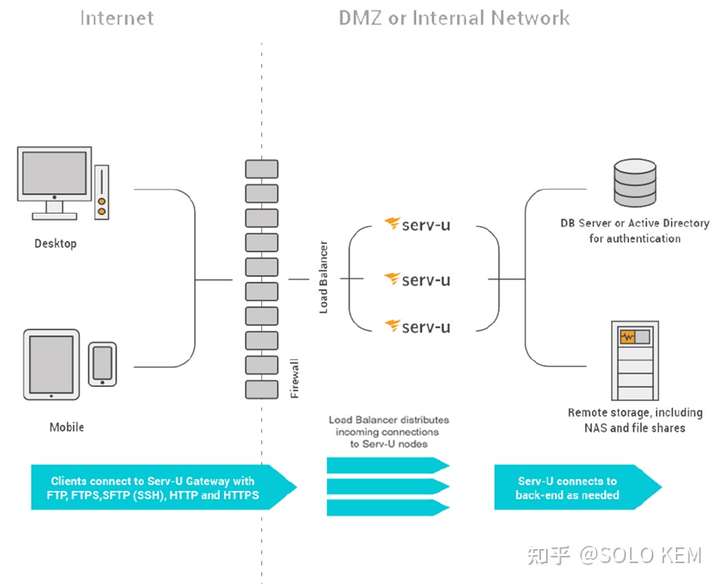
Serv-U can be deployed as a web farm of application servers to provide highly available (“HA”) services through horizontal scaling (a.k.a. “N+1”).
Serv-U MFT Server is the only Serv-U edition that support HA deployments because Serv-U’s HA configuration requires the use of external authentication sources. Up to five Serv-U servers are currently allowed in this configuration.

Firewall Configuration
The primary firewall supports FTP, FTPS (SSL/TLS), SFTP (SSH), HTTP, and/or HTTPS inbound connections from the Internet into Serv-U. This firewall may also be configured to allow outbound connections to support FTP/S active mode data connections, or may be “FTP aware” enough to open FTP data channels dynamically.
Load Balancer
A network load balancer must be used to distribute incoming connections to each Serv-U server.
Load balancers should be configured to preserve original IP addresses if you want to use Serv-U’s IP lockout protection. Load balancers should also use “sticky sessions” that lock all incoming connections from a particular IP address to a specific Serv-U server to allow FTP and FTPS connections to work properly.
Remote Storage
All user home folders, virtual folders and other Serv-U folders must be configured to use remote storage (for example, NAS or file shares) rather than local hard drives. Serv-U must be able to make a CIFS (Windows networking) connection to those resources.
Remote Authentication
- All Serv-U domains must use remote authentication provided by an ODBC-compliant database or Microsoft Active Directory (AD).
- If Serv-U accesses an ODBC-compliant database for remote authentication, then Serv-U must be able to make a database-appropriate connection to that database. For example, SQL Server connections are often made over TCP port 1433.
- If Serv-U accesses Active Directory (“AD”) for remote authentication, then your Serv-U server must be part of the AD domain and must be on the same network segment.
Variations
- On Windows Server the built-in Windows Network Load Balancer service can be used instead of a physical load balancer.
Advantages
- Active redundancy means that your Serv-U application servers are not single points of failure.
Disadvantages
- More difficult to set up than single-node systems. You must install Serv-U on each application server and point to the same shared resources.
- Direct connections from Serv-U to internal storage, internal databases, or Active Directory domain controllers are not permitted by many security policies.
- Live user statistics may be unreliable for individual users who sign on to multiple servers simultaneously. This can be partially mitigated for end user statistics – not group statistics – for end users who sign on from a single IP at a time via “sticky sessions” on your load balancer.
Highly available multi-tier (MFT) deployment
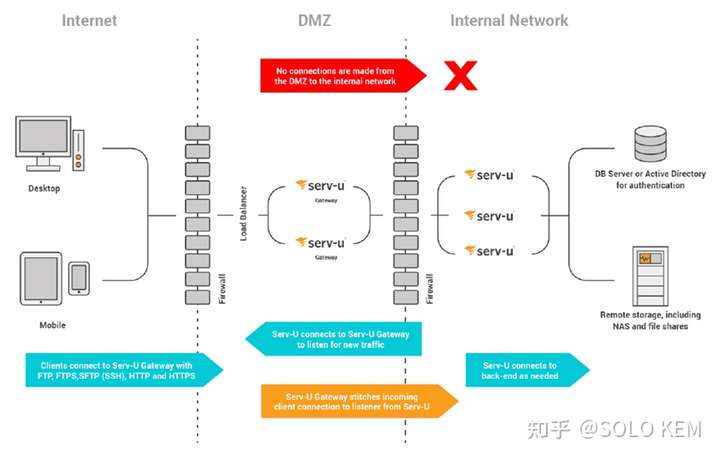
Serv-U can be deployed as a web farm of application servers to provide highly available (“HA”) services through horizontal scaling (a.k.a. “N+1”). It can also be deployed in a multi-tier architecture that meets or exceeds most managed file transfer (“MFT”) security requirements. Together, this sophisticated architecture allows you to:
- terminate all incoming transfer connections on a hardened server located in your DMZ segment
- ensure no data is ever stored in your DMZ segment
- avoid opening any inbound connections from your DMZ segment to the internal network
- avoid single points of failure
- scale up or down to meet actual demand
Serv-U MFT Server is the only Serv-U edition that supports HA multi-tier deployments because Serv-U’s HA configuration requires the use of external authentication sources. Up to five Serv-U servers and three Serv-U Gateways are currently allowed in this configuration.

Firewall Configuration
The primary firewall supports FTP, FTPS (SSL/TLS), SFTP (SSH), HTTP, and/or HTTPS inbound connections from the Internet into Serv-U. This firewall can also be configured to allow outbound connections to support FTP/S active mode data connections, or may be “FTP aware” enough to open FTP data channels dynamically.
The firewall between the DMZ segment and the internal network only needs to allow outbound connections from each of the Serv-U servers to each of the Serv-U Gateways over TCP port 1180.
Load Balancer
A network load balancer must be used to distribute incoming connections to each Serv-U Gateway.
Load balancers should be configured to preserve original IP addresses if you want to use Serv-U’s IP lockout protection. Load balancers should also use “sticky sessions” that lock all incoming connections from a particular IP address to a specific Serv-U server to allow FTP and FTPS connections to work properly.
No load balancer is required between the Serv-U Gateway tier and the Serv-U server tier.
Remote Storage
All user home folders, virtual folders and other Serv-U folders must be configured to use remote storage (for example, NAS or file shares) rather than local hard drives. Each Serv-U server must be able to make a CIFS (Windows networking) connection to those resources.
Remote Authentication
All Serv-U domains must use remote authentication provided by an ODBC-compliant database or Microsoft Active
Directory (AD).
- If Serv-U accesses an ODBC-compliant database for remote authentication, then each Serv-U server must be able to make a database-appropriate connection to that database. For example, SQL Server connections are often made over TCP port 1433.
- If Serv-U accesses Active Directory (“AD”) for remote authentication, then your Serv-U server must be part of the AD domain and must be on the same network segment.
Variations
- On Windows Server the built-in Windows Network Load Balancer service can be used instead of a physical load balancer to provide load balancing services to Serv-U Gateway.
- The two firewalls represented in the diagram are sometimes “two legs” of a single firewall controlling access between multiple segments.
- Serv-U Gateway and Serv-U may be deployed on different operating systems. For example, your Internet-facing Serv-U Gateway can be deployed on Linux even if you have deployed your Serv-U server on Windows. However, all Serv-U Gateways should use the same operating system and all Serv-U Servers should use the same operating system whenever possible.
Advantages
- Active redundancy means that your Serv-U application servers are not single points of failure.
- Fully satisfies the MFT requirement that no data at rest exists in the DMZ.
- Satisfies most security policy requirements by ensuring that direct connections to internal storage, internal databases, or Active Directory domain controllers are only made between computers on your trusted internal network.
- No CIFS, AD, or DB connections are ever made across a firewall.
Disadvantages
- More difficult to set up than single-node or single-tier systems. You must install Serv-U on each application server and point to the same shared resources. You must also configure a load balancer and configure ServU Gateways on both Serv-U servers.
- Live user statistics may be unreliable for individual users who sign on to multiple servers simultaneously. This can be partially mitigated for end users who sign on from a single IP at a time by using “sticky sessions” on your load balancer.
Gateway communication details
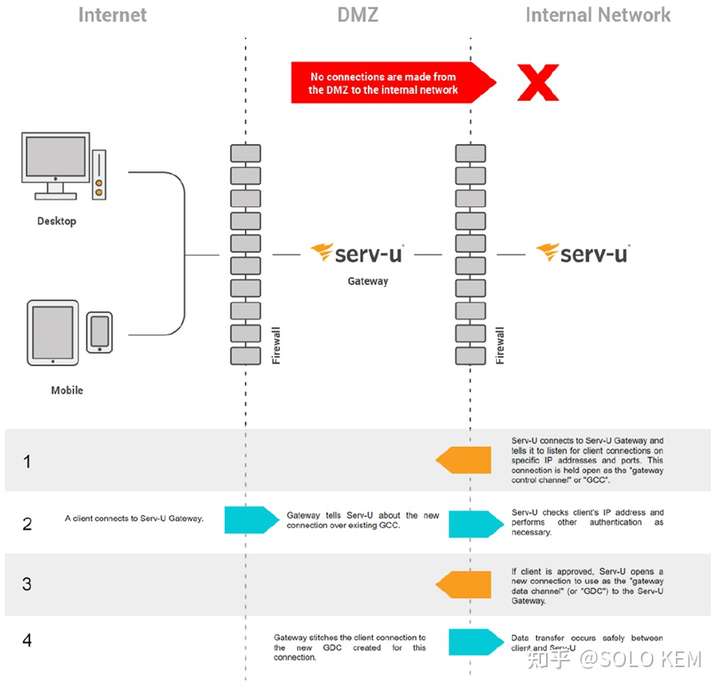
Serv-U Gateway is able to act as a secure “reverse proxy” by avoiding direct connections from the Internet or the DMZ into the internal network. Behind the scenes, all inbound connections are served by Serv-U Gateway by tying them to outbound connections from the internally-based Serv-U server. This allows Serv-U Gateway to perform its duty without ever making an inbound connection from the DMZ segment to the trusted network.

Assumptions
- The firewall guarding access from the Internet to the DMZ segment is configured to allow standard file transfer services (for example, FTP/S, SFTP via SSH, HTTPS, and so on) to the Serv-U Gateway.
- The firewall guarding access from the DMZ segment to the trusted internal network does not permit any connections from the DMZ to the internal network.
- Serv-U Gateway is powered up and listening for connections in the DMZ segment.
- Serv-U is installed in the trusted internal network.
Communication Walkthrough
1. When a Serv-U server starts up, it tries to connect to all its configured Serv-U Gateways. As it connects to each one, Serv-U provides specific instructions to each Serv-U Gateway about the protocols, IP addresses, and ports it should use to serve connections from the Internet. The connection Serv-U uses to provide this information is opened and reestablished as necessary so Serv-U Gateway can send messages back to Serv-U. This connection can be thought of as the “gateway control channel” or “GCC.”
2. When a file transfer client (for example, web browser, iPad, or FTP client) opens a connection to the Serv-U Gateway, the Serv-U Gateway will ask about the connection over the existing GCC. Serv-U performs any necessary IP checks and authentication against its own database or internal resources.
3. If Serv-U approves the incoming connection, Serv-U makes a new outbound connection from Serv-U to the Serv-U Gateway. This second connection can be thought of as the “gateway data channel” or “GDC.” If Serv-U denies the incoming connection Serv-U tells the Serv-U Gateway to deny the connection via the GCC and the Serv-U Gateway terminates the requesting client’s connection.
4. Serv-U Gateway stitches the original client connection and the GDC created for the approved connection together. From that point forward data transfer occurs between the client and Serv-U until either side terminates the session.
Security
- Use of protocols that encrypt data in transit (for example, FTPS, SFTP over SSH and HTTPS) is supported and encouraged when clients connect to Serv-U Gateway.
- The communication channels between Serv-U and Serv-U Gateway only encrypt traffic between the two systems if the client uses an encrypted protocol to connect. For end-to-end secure transport, it is recommended that the client should connect using an encrypted protocol.
- No data or authentication information is ever stored at rest in the DMZ.
Additional references
The Serv-U Administrator Guide describes how to set up domains, groups, user, and folders to support a Serv-U HA deployment. The following sections are particularly pertinent:
- Mapping home folders and virtual folders to Windows Shares
o Virtual Paths – Physical Path
o User Information – Home Directory
o Directory Access Rules – Access as Windows Users
- Using a common share to handle SSH keys, SSL certificates, server welcome message, FTP message files, event command executables, and log files
o User Information – SSH Public Key Path
o Encryption – Configuring SSL for FTPS and HTTPS
o Encryption – SFTP (Secure File Transfer over SSH2)
o FTP Settings – Server Welcome Message sub
o FTP Settings – Message Files
o Serv-U Events – Execute Command Actions
o Configuring Domain Logs – Log File Path
- Using external authentication
o Domain Settings to set database-based or Active Directory authentication
o Serv-U Database Integration Guide for database-based authentication
o Serv-U Windows Groups for Active Directory authentication
The Serv-U Database Integration Guide contains detailed information and instructions to set up an authentication database in support of Serv-U web farms. Supported databases include SQL Server, Oracle Database, MySQL, PostgreSQL, and several other ODBC-compliant relational databases.